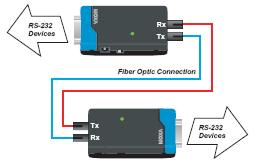
The TCF-90 is a compact media converter that transmits RS-232
signals over optical fiber. Power is derived from either the serial
port or an external power source. The TCF-90 extends RS-232
transmission up to 5 km with multi-mode fiber, or up to 40 km with
single-mode fiber. A pair of TCF-90 converters can be used to connect
two RS-232 devices with optical fiber in full duplex mode. The optical
fiber isolates the data signals from dangerous increases in ground
potential, ground loops, and electrical EMI/RFI noise, and enhances
data security by eliminating the harmful effects of RF radiation and
susceptibility to electromagnetic radiation.
Self-powered RS-232 to Optical Fiber
Connecting RS-232 devices to the TCF-90 is easy. The ST-type optical
fiber connector is designed especially for data communication
applications that transmit data either between or within buildings. The
TCF-90 can be used for industrial applications and for applications
that require secure data transfer.
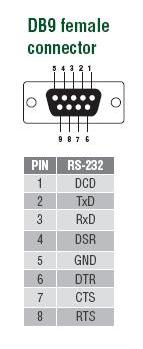
The RS-232 port on the TCF-90
uses a DB9 female socket to connect directly to the host PC, with power
drawn from the TxD, RTS, and DTR lines. Although the TCF-90 can obtain
enough power from the three data/handshake lines whether the signal is
high or low, we strongly recommend setting either the RTS or DTR signal
to ON.
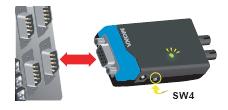
Patented LED Port Power Indicator
It's easy enough to use a multimeter to test if the serial device is
supplying the TCF-90 with enough power through the serial connection,
but why bother when the TCF-90 can do the testing for you? Connect the
TCF-90 to the device's RS-232 port and set the SW4 switch to Test mode.
If the patented port power LED indicator lights up, the TCF-90 is
receiving enough power. If the LED does NOT light up, you will need to
attach an external power source to the TCF-90.
Optional External Power Source
In most circumstances, the TCF-90 should be able to operate without
using an external power source. However, an external USB power cord or
DC power supply can be used in situations where the handshake lines are
not available, both the RTS/DTR signals are set to OFF, or the attached
device's serial interface chip provides less power than required.

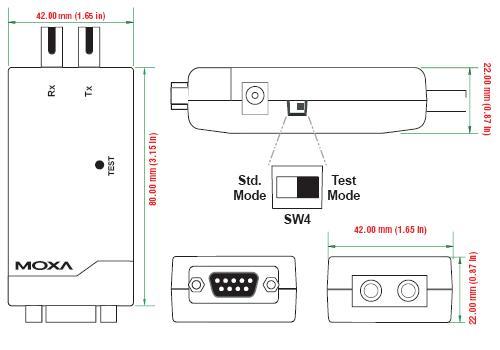
Dimensions

Pin Assignment